Friday, 26 August 2016

Single Dimensional Array


It is a simple form of array. It consists of type, name and its elements(subscripts or indices).

Syntax: type array-name[size];
It's type is also called the base type. It starts with 0 and goes till 'size-1' . Let's understand this with an example.


Program:

#include<iostream.h>
#include<conio.h>
void main()
{
clrscr();
int i, marks[3];
for(i=0; i<3; i++)                /* i is taken zero because our array starts with zero
                                             so it will make us easy to understand it's
                                            elements position
                                          */
{
 cout<<"Enter your Marks in paper "<<i+1<<": ";
 cin>>marks[i];
}
cout<<"\nHere are the Marks of Student\n";
for(i=0; i<3; i++)
{
 cout<<"Paper "<<i+1<< "= "<<marks[i]<<"\n";
}
getch();
}


Output:

Enter your Marks in paper 1: 20
Enter your Marks in paper 2: 17
Enter your Marks in paper 3: 18

Here are the Marks of Student
Paper 1: 20
Paper 2: 17
Paper 3: 18

The above array takes the Marks from the Student. The first values goes at position 0, second stores at position 1 and last at position 2. Then in the next Loop values stored in the Array marks is displayed.

Thursday, 25 August 2016

ARRAYS


Array is having a large number of data of same type at a single place. The proper definition will be: An  Array is a collection of  variables of the same type that are referenced by a common(same) name.
It can be of any type : char, int, float or even user defined types.

Array are of different types:

1. One- dimensional arrays: have only one Row or column.

Syntax: type array_name[size];


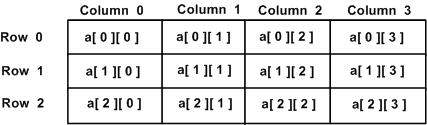
2. Multi-dimensional arrays: It has both rows and columns. You can also say that having many single arrays in one array. The simplest example is Two-dimensional array but it can have more than two-dimensions.

Syntax: type array_name[rows][columns];

Nested Loops


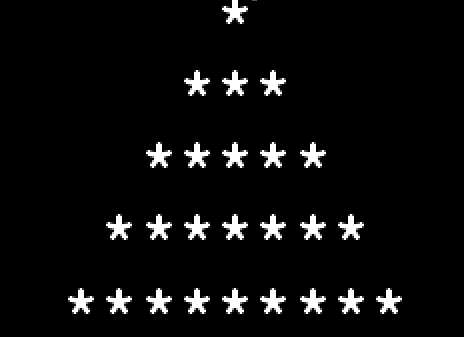
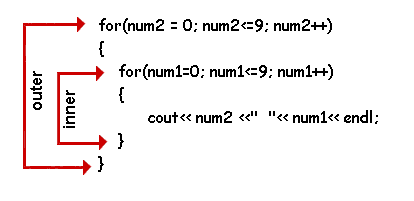
A loop containing another loop in its body is a Nested Loop. In Nested Loop the inner loop terminate before the outer loop.

Program:

//Assuming that all the header files are included
.
.
.
for(i=1; i<5; i++)    //Considering that variable i and j are already created
{
cout<<"\n";
for(j=1; j<=i; j++)
cout<<"*";
}
.
.
.

Output:

*
**
***
****

First the value of i is assigned as 1, then comes the inner loop j =1(also assigned). Now inner loop having j will run until the test expression becomes true and then value of i increases from 1 to 2. Then inner loop will run again and the will go on like this until the test expression of i becomes true.Then it will terminate.

The do-while Loop


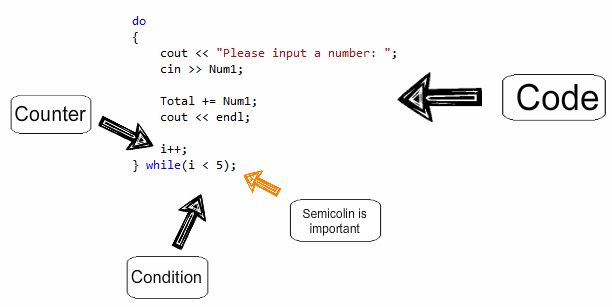
It is an exit controlled loop. It means that it evaluated its test expression after executing the loop body because its test expression lies at bottom of the loop. It runs atleast once whether the condition is true or false. Other loops(for and while), first checks the test expression then executes accordingly.


Syntax: do
              {
                   statement;
              }
              while(test_expression);   //Put semicolon after while statement


Program: 


#include<iostream.h>
#include<conio.h>
void main ()
{
clrscr();  // For clear screen
int num=1;
do {
           cout<<num<<"\n";
           num++;
      }
     while(num<10);
getch();
}


Output: 

1
2
3
4
5
6
7
8
9
The do while loop will run as long as 'num' is smaller than 10.
You can ask questions if you have doubts regarding C++.

THE WHILE LOOP


It is an entry controlled loop. The variable should be initialized before the loop begins as uninitialized variable can be used in an expression. Then variable is updated inside the body of while Loop.


Syntax: while(expression)
                       {
                          loop body
                        }


Program:


#include<iosteam.h>
#include<conio.h>
void main()
{
int num=1;
while(num<10)
{
cout<<num<<" ";
num++;
}
getch();  
}

Output: 1 2 3 4 5 6 7 8 9

The loop will run as long as the condtion is true i.e. as along as num<10. When it becomes false, the loop will terminate.

Wednesday, 24 August 2016

The for Loop


It is a simple loop. Loop means repeating the same things again and again until the condition has been met.
It is called the simplest because all the loop control elements gathers at same place making it more convenient to use.

Syntax:  for(initialization expression; test expression; update expression)

                       body of the loop;


Program:

#include<iostream.h>
#include<conio.h>
void main()
{
clrscr();
int i;
for(i=1; i<=10; i++)
cout<<i<<" ";
getch();
}

Output:

1 2 3 4 5 6 7 8 9 10

 i=1: The loop starts with the initialization.As soon as the variable's value had assigned then comes the test expression.
i<=10 : it will check whether the condition is true or false. If true, it will execute the loop and then comes the update expression.
i++: this will update the value of i from 1 to 2.
Now it will check again the test expression. It will be true again so it will run the loop. This will go on until the i becomes 11. Now the test expression will become false. So the loop will terminate.

For loops are generally used for making patterns, borders etc.

The Switch statement


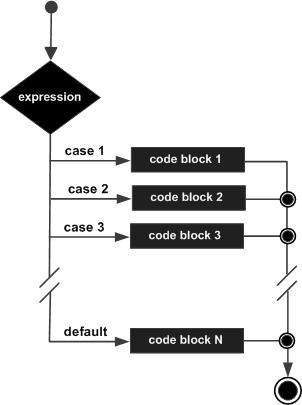
Switch is used when we know what our conditions will be or whey they are specific. The select statement test the value of an expression against  a list of integer or character constants. The statement is executed as soon as the match is found.


Syntax: switch(expression)
              {
                case constant1: statement;
                                         break;
                case constant2: statement;
                                         break;
                case constant3: statement;
                                          break;
                default:             statement;
             }
When a match is found the statement executes and then it breaks to come out of the switch. The default statement is executed when no matches are found. It doesn't need break statement.

Program:

#include<iostream.h>
#include<conio.h>
void main()
{
clrscr();  // Used for clearing the screen before running the program
int month;  //Variable made of type int
cin>>month;   Taking the value from User
switch(month)
{
case 1: cout<<"January";
            break;
case 2: cout<<"February";
            break;
case 3: cout<<"March";
            break;
case 4: cout<<"April";
            break;
case 5: cout<<"May";
            break;
case 6: cout<<"June";
            break;
case 7: cout<<"July";
            break;
case 8: cout<<"August";
            break;
case 9: cout<<"September";
            break;
case 10: cout<<"October";
            break;
case 11: cout<<"November";
            break;
case 12: cout<<"December";
            break;
default: cout<<"Sorry!";
}
}

So variable month is taking the value from user and comparing it to the switch case.
Output:         2
                February

Let's understand this with another example.
Q. Find whether the giver character is a vowel or a consonant.(With switch)


Program:


#include<iostream.h>
#include<conio.h>
void main()
{
clrscr();
char character;  //Variable made of type char
cout<<"Enter a character: ";
cin>>character;
switch(character)
{
case 'a':
case 'A':
case 'e':
case 'E':
case 'i':
case 'I':
case 'o':
case 'O':
case 'u':
case 'U': cout<<"It's a Vowel";
break;
default: cout<<"It is not a Vowel";
}
getch();
}

Now this program will accept a character variable from user and will start to match it with the cases. If the character is Vowel then it will display "It's a Vowel". It will work just fine.


Output:


Enter a character: i
It's a Vowel